SoloBand Midi Backing Tracks

What is MIDI?

MIDI is a digital music system for creating and playing computer-generated sounds and music.
Midi files are tagged as (.mid) files.
(midi is also used for Karaoke (.kar) songs)

Most PC computers play MIDI files

BACKING TRACKS

The backing tracks most professional musicians use are high-quality, expensive “wav” or “mp3” files. However, once these expensive sound files have been created, they cannot be edited or modified in the field.
But… there is a legacy background music file that can easily be modified. MIDI and Karaoke backing tracks use (.mid) or (.kar) files because they allow a musician or karaoke singer to easily alter the “chord” or “key” of the music they want to play or sing in.

As an alternative, some musicians today use computer- or gadget-generated looping systems for background accompaniment. However, such systems cannot save individual settings for future use. Therefore, “on the fly” results are very difficult to achieve.
MIDI files, on the other hand, can be created and saved for later playback using instruments like bass, drums, and keyboards. Best of all, once a MIDI file is created, it is easy to modify the volume and pitch of any or all instruments in the backing track. 

For my SoloBand system, I use custom MIDI backing tracks that I have personally created to replicate a three-piece local band. These backing tracks usually consist of a bass guitar, drums, and a piano or organ.

How versatile is the MIDI Sound system?

Performing as a local band, I try to keep my on-stage sound as close to a small local band sound as possible, so I use only bass, drums, and either piano or organ.  These groups of musical instruments are MIDI friendly and the ones most people are familiar with and expect from a local band.

Within a MIDI song these various bass guitar, keyboard and drum sounds are identified by key, pitch, duration, and strength (volume), and all of these instrument notes and sounds can be indiviually modified to suit each performers requirements.

Performing WITH a local band, while trying to keep my on-stage sound as close to a local band sound as possible, I also try to play in the style of a typical local band.

    This would only seem reasonable to someone who has played with various local bands over a long period and understands what that experience is like.

    Typically, a local band is 3, 4, or (at one point 7 or 8) other musicians, all of whom are at different stages of development or experience.

    When I started my first professional local band, we were four teenagers with little or no experience. In fact our drummer had never played drums (but he could afford to buy a drum set). So he was a natural.

    Basically, anyone playing as a local musician is usually exempt from public criticism for most mistakes. In fact, I know from experience that most people never notice an error unless the tempo varies so much that they have to stop dancing.

    So, as a local musician, don’t worry if your sound doesn’t meet recording quality. No one expects it.

From Theory to Making Music

In SoloBand you will be dealing with pre-constructed custom midi songs. All of the instruments and their notes have already been created.

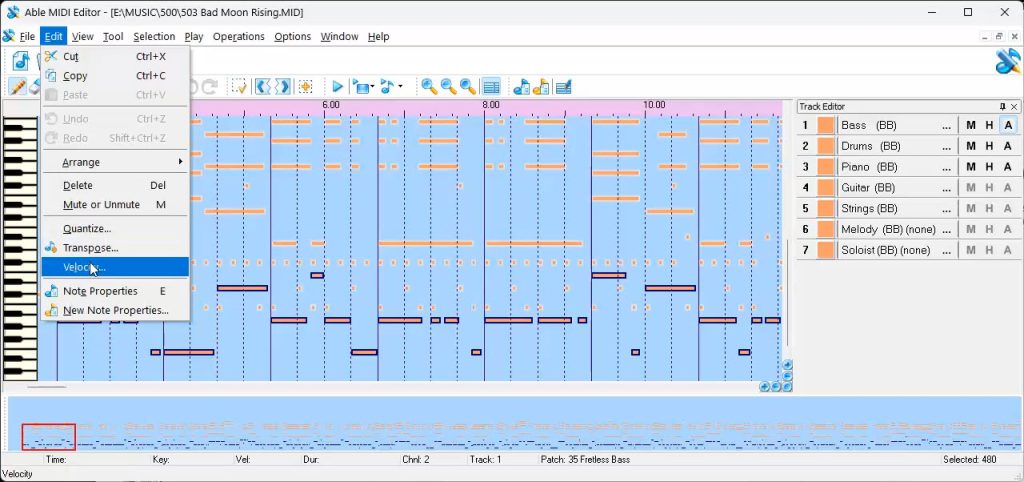
Edit Midi File

Therefore, our main focus within midi will be…

  1. Changing the key the “pitch” in which the notes are played. If a MIDI song was constructed in the key of “C”, a performer may want to play in the key of “E” (This kind of key change is usually made to meet a singer’s preferred pitch — to sing in a specific “key”).
  2. Changing the strength or loudness of an instrument or group of instruments.

NOTE: The use of MIDI to provide background music is unique. Not many people use MIDI this way. In fact, the whole concept of being a SoloBand is unique.

That means a SoloBand has very little competition. The whole local music industry is wide open for you to take advantage of.

MIDI is underutilized because it does not produce recording-quality sounds.
Playing local music “LIVE” does not require or need recording quality sound.

MIDI Equipment You May Need

As a SoloBand performer you will need the following equipment and software to play midi files live on stage. To reduce costs, try to find used equipment whenever possible.

  • A Windows Laptop computer (XP or newer). You need a portable laptop to play the backing tracks live on stage. You don’t want to be dragging a heavy tower computer around. Personally, I’m using a second-hand Windows 7 laptop for all my stage work. (I also carry a spare laptop when I play out of town)
  • A USB Foot Pedal. This is used to easily start playing a song when you are ready. It’s more convenient than tapping a keyboard. (Amazon has these for around $20)
  • Midi Software:

1) VanBasco’s Midi Player – used to organize and manage your MIDI playlists.

This free software was discontinued, so I provide a free copy.

2) Able Midi Editor – Used to modify MIDI songs, such as changing the song key (from “E” to “G,” etc.) to match your vocal range.

This software is priced at $24.90

3) Tutorials – With my MIDI download package, I also provide easy-to-use tutorials that show exactly how to modify the MIDI files.